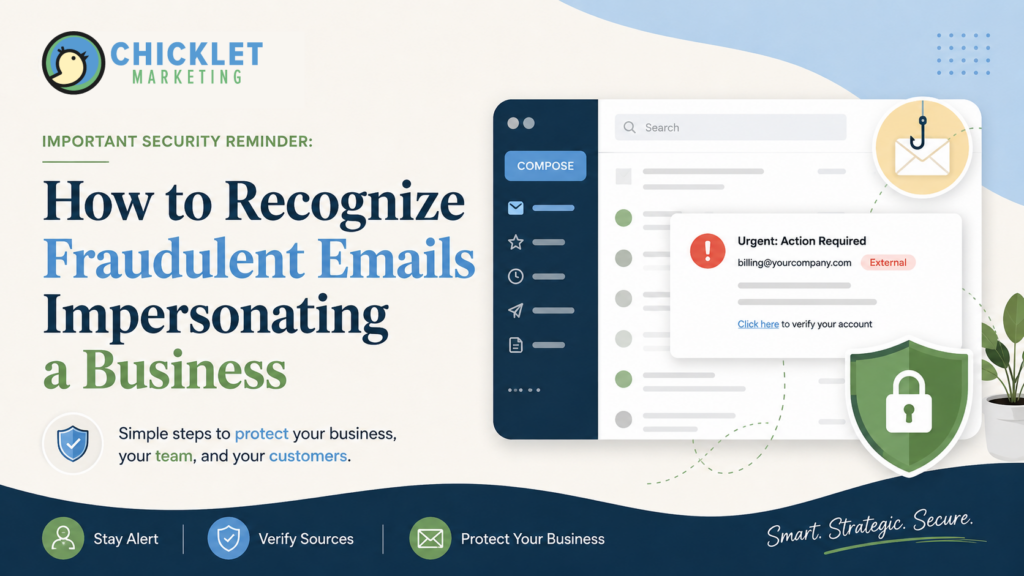
All official Chicklet Marketing emails will only come from an email address ending in @chickletmarketing.com. Chicklet Marketing will never contact clients from a Gmail address regarding website updates, hosting, renewals, SEO, security, payments, or urgent action.
Email is one of the most common ways businesses communicate with clients, vendors, team members, and community partners. It is also one of the easiest places for scammers to create confusion by pretending to be someone you already know and trust.
Chicklet Marketing recently became aware of fraudulent emails and messages being sent to a small number of our clients by individuals impersonating our company and Alexis Chouinard. These messages were sent from Gmail addresses that are not associated with Chicklet Marketing, including:
- info.chickletmarketing@gmail.com
- hello.chickletmarketing@gmail.com
- alexis.chickletmarketing@gmail.com
- hello.chicletmarketing@gmail.com— misspelled without the “k”
Please note: one of the fraudulent addresses uses a misspelled version of Chicklet Marketing, written as “chicletmarketing” without the second “k.” This is a common tactic used in impersonation attempts to make a fake sender address look legitimate at a quick glance.
The emails used Chicklet Marketing’s company name, publicly available branding, and even Alexis’s headshot in an attempt to appear legitimate.
We have also seen similar impersonation attempts involving third-party messaging or contact systems, including GoDaddy Conversations and requests to move communication to WhatsApp. Even if a message appears to use Alexis’s name, please verify the actual sender or platform before responding.
These fraudulent messages do not mean your website, domain, plugins, hosting, or account are at risk because of anything stated in the scam email. The language is designed to create urgency and pressure recipients into responding.
At this time, there is no indication that Chicklet Marketing’s internal accounts, websites, hosting servers, or client accounts have been compromised. This appears to be an external impersonation attempt using information that was publicly available online.
Although the messages were not sent by our team, they are an important reminder for every business owner and email user: always take a moment to review the sender’s full email address before replying, clicking a link, opening an attachment, or approving a request.
What Is Email Impersonation?
Email impersonation happens when someone sends a message that is designed to look like it came from another person, business, or organization.
The sender may use:
- A familiar person’s name
- A business name or logo
- A copied email signature
- A public headshot
- A similar-looking email address
- Information gathered from websites, social media, or online directories
The goal is to make the message feel familiar enough that the recipient responds without looking closely.
A fraudulent email does not always look obviously fake. It may be professionally written, include correct company information, or reference services that seem relevant to the recipient.
That is why the sender’s actual email address matters so much.
Always Check the Full Sender Email Address
The name displayed in your inbox is not always the true sender.
An email may appear to be from “Alexis Chouinard” or “Chicklet Marketing,” but the address behind that display name could be completely unrelated.
All official Chicklet Marketing communication will only come from an email address ending in:
@chickletmarketing.com
Examples of legitimate Chicklet Marketing addresses include:
- alexis@chickletmarketing.com
- aneesa@chickletmarketing.com
- serverops@chickletmarketing.com
- info@chickletmarketing.com
We will never contact clients from an @gmail.com address representing Chicklet Marketing.
Before responding to a message, especially one involving website concerns, invoices, security warnings, login requests, or unexpected work, click or hover over the sender’s name to view the full email address.
A familiar display name is not enough.
Why Fraudulent Emails Can Look So Convincing
Business owners often share information publicly because it helps people learn more about their company.
Websites, LinkedIn profiles, social media pages, Google Business Profiles, online portfolios, and local directories may include:
- Company names
- Staff names and titles
- Headshots
- Logos
- Service information
- Client names
- Contact information
- Business relationships
Unfortunately, scammers can also use that public information to make fraudulent emails appear more believable.
A copied logo or headshot does not mean the sender has access to a company’s internal systems. It may simply mean they copied an image from a public website or social media profile.
This is why visual branding alone should never be used to verify whether an email is legitimate.
A Real Example of Email Impersonation
Below is a screenshot showing one of the fraudulent sender email addresses used to impersonate Chicklet Marketing.
Although the message included familiar branding elements and appeared to come from Alexis Chouinard, the full sender address revealed that it was sent from an unrelated Gmail account rather than an official @chickletmarketing.com email address.
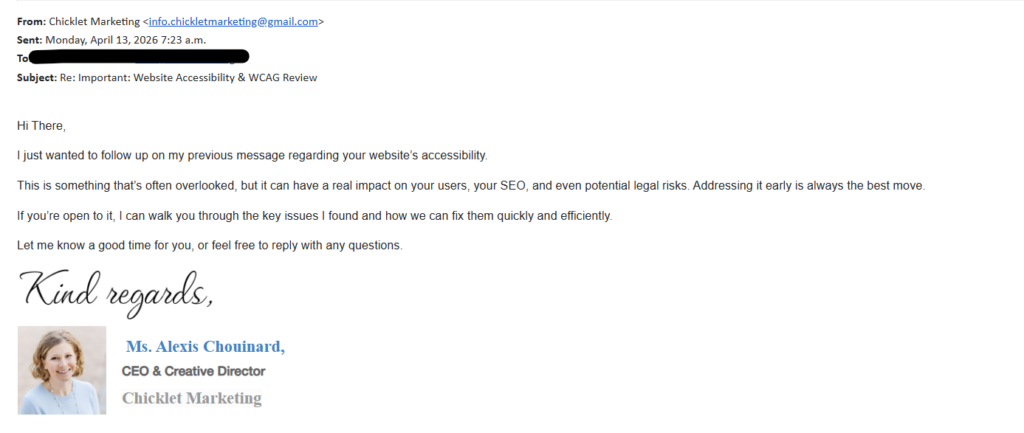
Example of a fraudulent email impersonating Chicklet Marketing. Always review the sender’s full email address before replying, clicking links, or approving unexpected requests.
Common Warning Signs of a Suspicious Email
Fraudulent messages can vary, but there are several warning signs worth watching for.
The Sender Address Does Not Match the Business
A company may have a familiar name in the display field, but the actual email address may use Gmail, Yahoo, Outlook, or a domain that is slightly different from the company’s real website.
For example, a legitimate business email may end in:
@companyname.com
A suspicious version may use:
companyname@gmail.com
hello.companyname@gmail.com
@company-name.com
@companyname-support.com
Small differences matter.
The Message Was Unexpected
Be cautious when you receive an email about a problem, service, invoice, audit, payment, password, or security issue that you were not already expecting.
A legitimate request can still be unexpected, but it is always worth confirming through a known contact method before taking action.
The Email Creates Urgency or Pressure
Fraudulent emails often try to make recipients act quickly.
They may suggest that:
- Your website has a serious issue
- Your account will be suspended
- A payment is overdue
- You need to approve work immediately
- A security problem must be fixed right away
- You may face legal or financial consequences
Urgency can make people act before they stop to verify the message.
The Email Includes Unexpected Links or Attachments
Do not click a link or open an attachment simply because the email looks familiar.
If you were not expecting the message, verify it first.
The Message Asks for Sensitive Information
Be cautious if an email asks for:
- Passwords
- Login credentials
- Payment information
- Banking details
- Verification codes
- Personal identification information
- Access to a website, email account, or online platform
Legitimate businesses should not ask you to send passwords or sensitive account information through an unexpected email.
The Greeting or Language Feels Unusual
A generic greeting such as “Hi There” may be a warning sign, especially when the sender normally knows your name.
However, grammar and formatting alone are not enough to determine whether an email is legitimate. Some fraudulent emails are well-written and professionally designed.
What To Do If You Receive a Suspicious Email
If you receive an email or message that appears to be from Chicklet Marketing but something feels off, do not respond immediately.
Instead:
- Check the sender’s full email address.
Confirm that it ends in @chickletmarketing.com. If the message comes from a Gmail address or any other email address that does not end in @chickletmarketing.com, it is not from Chicklet Marketing. - Do not reply to the message.
Avoid engaging with the sender or confirming that the email address is active. - Do not click links or open attachments.
Wait until the message has been verified before clicking anything. - Do not approve website updates, renewals, SEO work, payments, or access requests.
Fraudulent messages often use urgency to pressure recipients into responding quickly. - Contact us through a known method.
Use an email address, phone number, or website contact form you already trust rather than replying directly to the suspicious message. - Forward the message to Chicklet Marketing for verification.
This helps us document the incident, track impersonation attempts, and alert others when necessary. - Report the message as phishing or spam in your email provider.
Most email providers include an option to report suspicious messages. - Delete the email after reporting it.
This helps prevent accidental interaction later.
We appreciate our clients who take the time to notify us, as those reports help us document impersonation attempts and alert others when necessary.
What To Do If You Already Clicked a Link or Replied
If you clicked a suspicious link, opened an attachment, entered login information, or replied with sensitive information, take action as soon as possible.
Depending on what happened, you may need to:
- Change the password for the affected account
- Enable multi-factor authentication
- Contact your email provider or IT support team
- Review recent account activity
- Notify your bank or payment provider if financial information was shared
- Run a security scan on your device
- Let the impersonated business know what occurred
The sooner you act, the better.
A Simple Email Verification Habit
One of the best habits you can build is to pause before acting on an unexpected email.
Ask yourself:
- Was I expecting this message?
- Does the sender’s full email address match the business?
- Is the request consistent with how this person normally communicates?
- Is the message asking me to act quickly?
- Does it include a link, attachment, or request for sensitive information?
- Can I verify the message using a phone number or email address I already trust?
That brief pause can prevent a lot of confusion.
A Reminder for Chicklet Marketing Clients
All official Chicklet Marketing emails will come from an address ending in:
@chickletmarketing.com
We will never contact clients from an @gmail.com address representing Chicklet Marketing.
If you ever receive a message that appears to be from our team but you are unsure whether it is legitimate, please contact us directly before responding or clicking anything.
You can reach Chicklet Marketing at:
info@chickletmarketing.com
(804) 322-3552
We appreciate our clients who have taken the time to verify suspicious messages and bring them to our attention.
Final Thoughts
Fraudulent emails can look convincing, especially when they use familiar names, logos, headshots, or business information.
The most important thing to remember is that appearances can be copied, but the sender’s actual email address tells a much clearer story.
Always review the full sender address, avoid interacting with unexpected links or attachments, and verify unusual requests through a trusted communication channel.
A few extra seconds of caution can make a meaningful difference in protecting your business, your accounts, and your information.